ShareASale now offers two factor authentication for all accounts.
 Two factor authentication is a safeguard to help prevent unauthorized people from accessing your account.
I have been using it for Dropbox, Facebook, and Gmail, and now ShareASale.
ShareASale is using “soft tokens” for their second factor, which means you will receive your code to login via your mobile device.
Their setup is compatible with “Google Authenticator” (that’s the app I use on my iPhone for this) and “Amazon Virtual MFA”.
The apps display a 6 digit code that changes every 30 seconds.
Once you have activated two factor authentication for your ShareASale account, you will need to append this 6 digit code to the end of your password each time you log in.
I literally got it set up in a minute.
I’d encourage everybody using ShareASale to activate this feature to better protect their accounts.

 A: I don’t want to share the URL and embarrass the person asking the question, but the first problem is that it’s on Blogger.


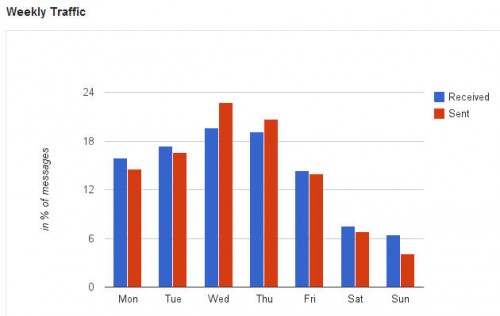
 So it has been fascinating to me to see a monthly analysis of my email activity through Gmail Meter.


 This three day conference included an exhibit hall with affiliate merchants, vendors, and networks, as well as multiple tracks of educational sessions covering the latest trends and information from affiliate marketing experts.